
Two levels
A top level (big header) and, if you want, a subcategory (subheader) for each guest.
Organize VMs and containers into colored sections — like Production › Network, Testing, Template — right in the Server View, with a screen to pick colors, order and style.
Run it on the Proxmox node, as root. Then reload the web UI (F5).
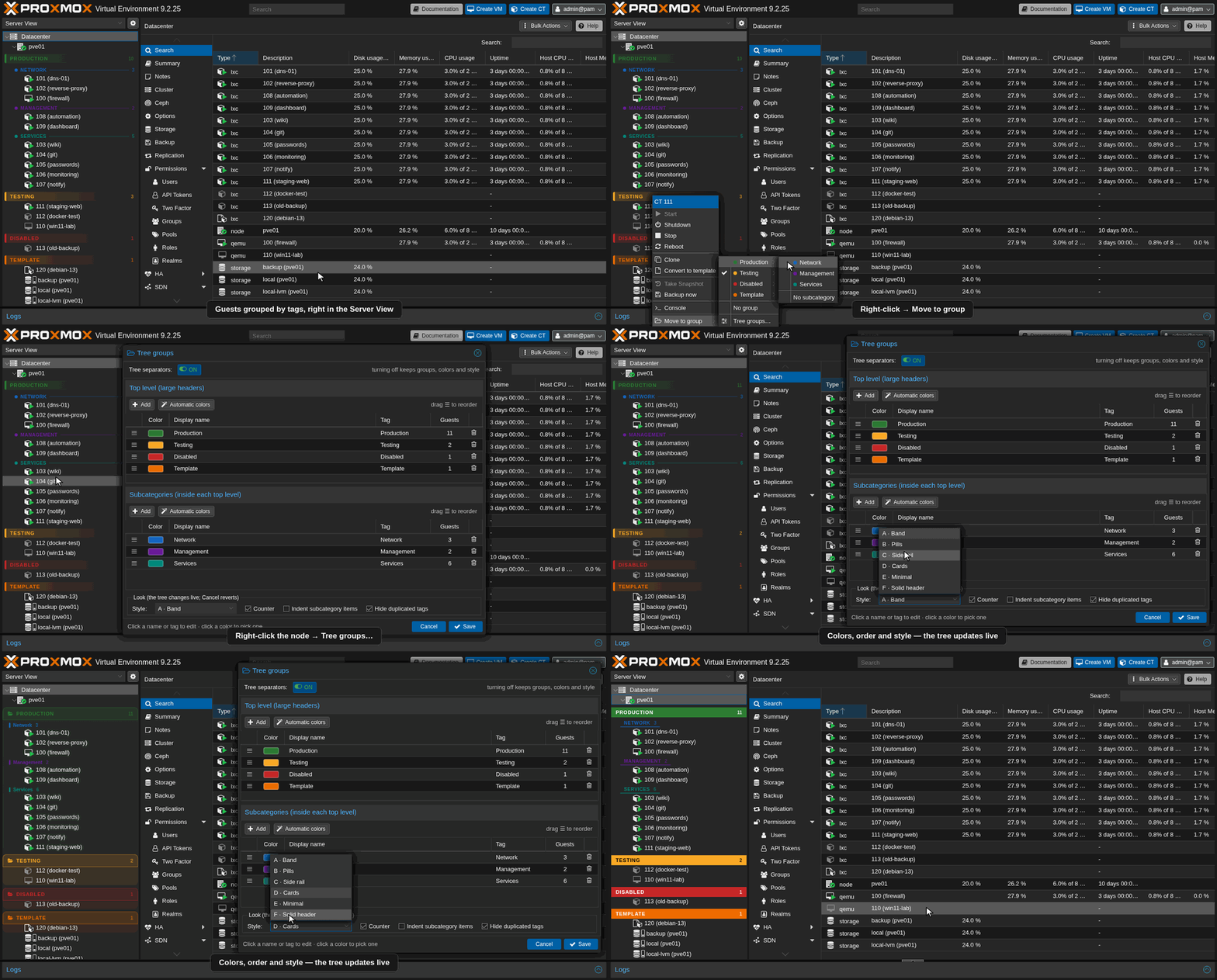
All images use a fictional lab (node pve01), not a real server.
Same guests, same tags. pve-organize just turns those tags into headers, so a long flat list becomes sections you can scan at a glance.
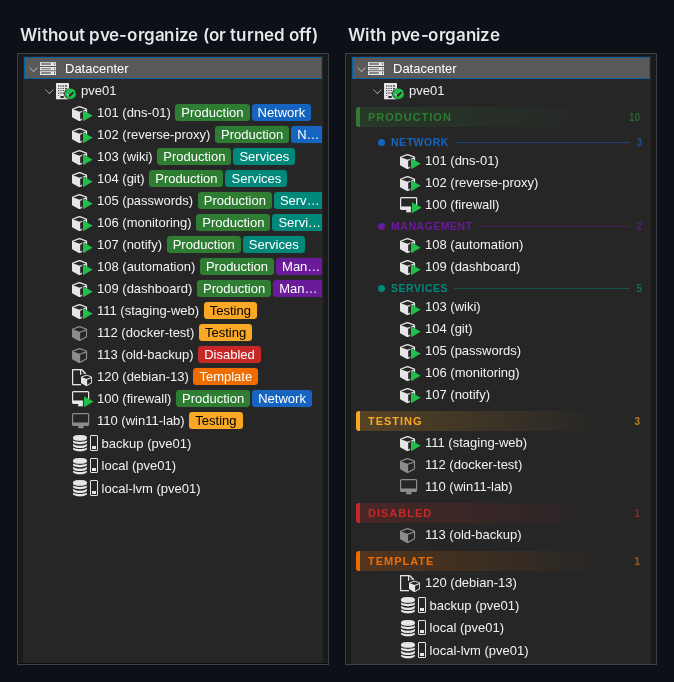
Everything happens in the web UI. Nothing new is stored on your guests.
A top level (big header) and, if you want, a subcategory (subheader) for each guest.
A guest tagged Production;Network shows up under PRODUCTION › Network. No new data on the servers.
Change a guest's group in two clicks, straight from the tree.
Create groups, pick colors or let them be automatic, drag to reorder, 6 styles, counter, indent and an ON/OFF switch — with live preview.
Settings live in the Datacenter Notes and Tag Style, so every admin and browser sees the same tree.
Comes back by itself seconds after a Proxmox update — no reinstall. Follows the Proxmox language: English, Portuguese and Spanish.
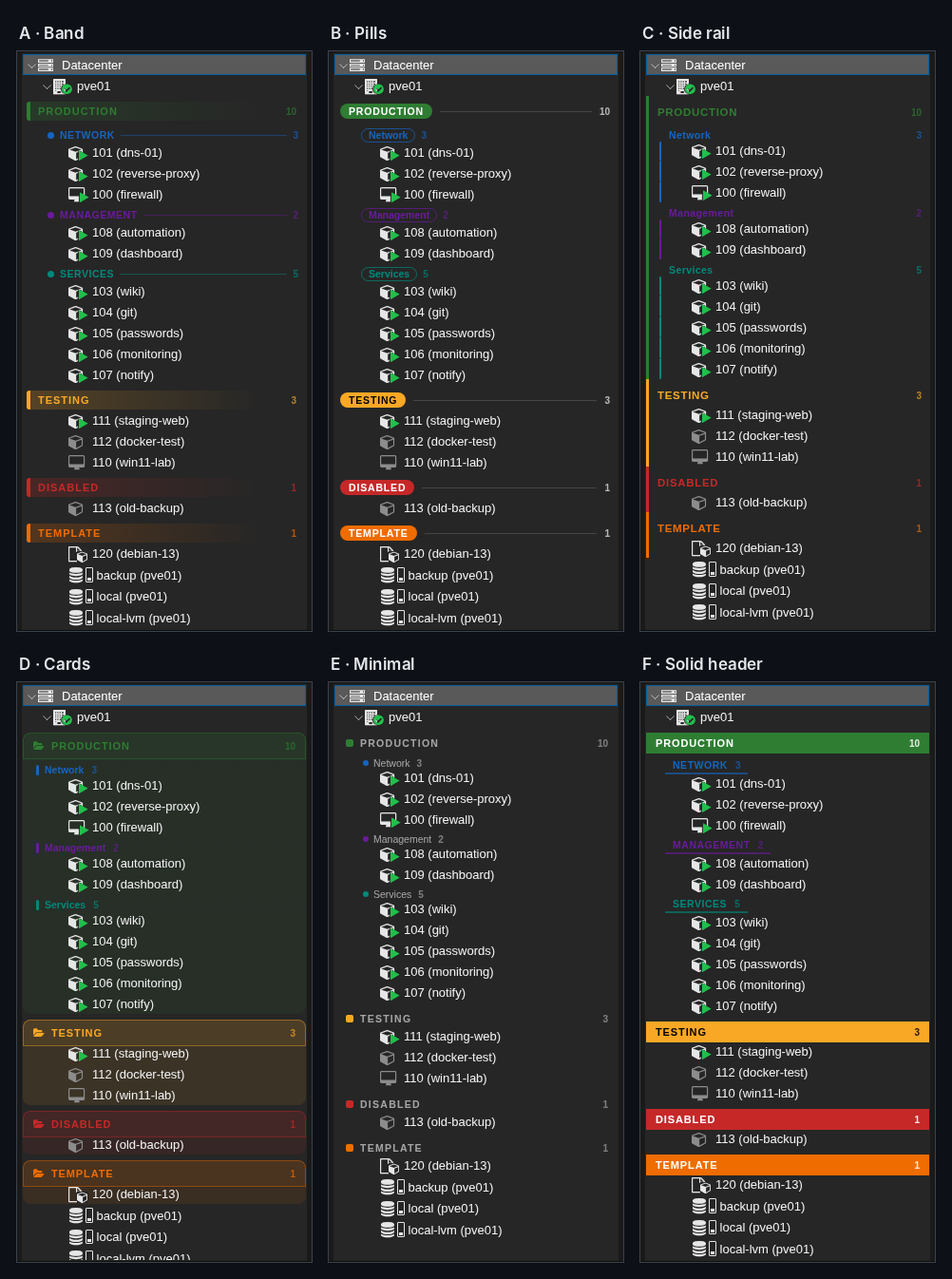
Six header styles, dark and light themes, and a settings screen right inside the Proxmox UI.
Proxmox VE already has the Tag View (since 8.3) and the Pool View. They solve similar problems; pve-organize keeps the Server View you already use, just organized.
| pve-organize | Tag View | Pool View | Mods replacing pvemanagerlib.js | |
|---|---|---|---|---|
| Stays in the Server View (grouped by node) | ✓ | ✗ | ✗ | varies |
| Each guest appears in one place only | ✓ | ✗ once per tag | ✓ | varies |
| Two levels (group › subgroup) | ✓ | ✗ | ✗ | ✓ |
| Colored headers, custom order, styles | ✓ | ✗ | ✗ | ✗ |
| Settings screen in the web UI | ✓ | — | — | ✗ |
| Settings shared by the whole cluster | ✓ | ✓ | ✓ | ✓ (tags) |
| Does not modify Proxmox files | ✓ injects a script | ✓ | ✓ | ✗ |
| Survives apt upgrade | ✓ watcher + apt hook | ✓ | ✓ | usually ✗ |
| Official / supported by Proxmox | ✗ | ✓ | ✓ | ✗ |
Need permissions per group? Use pools — pve-organize is purely visual and works alongside them.
The installer downloads the latest release and checks every file against its SHA256SUMS before installing.
In the web UI: select the node → >_ Shell. Or over SSH, as root. Not on your own computer.
$ ssh root@<node-ip>
It installs the latest published version and stops if any checksum does not match.
# bash -c "$(curl -fsSL \
  https://github.com/diego-luz/pve-organize/releases/latest/download/install.sh)"
Back in the browser, press F5. Right-click a guest → Move to group, or open Tree groups… to set things up.
F5 → https://<node-ip>:8006
Tested on Proxmox VE 9.2 and 8.4. 8.0–8.3 are allowed with a warning; versions before 8 are refused. In a cluster, install on each node whose web UI you use.
Turn it off and the original Proxmox tree is back; your groups stay saved. Uninstall removes everything that was installed.
# pve-organize status   # version, on/off, watcher…
# pve-organize off      # remove from the UI, keep config
# pve-organize on       # load it again
# pve-organize uninstall
A single script added to the web UI. Read every line on GitHub.
pve-organize uninstall and press F5. What changed in each version is in the CHANGELOG.Install in one command, turn it off in another. Free and open source.